Three working addresses per video
The video page, the player address and the mobile status page all resolve to the same file. Whichever of the three you happened to copy, the parse starts from a door that opens.
Paste a Weibo video link and SniffVid asks the parsers for the file behind it. Weibo gives one video several addresses — the video page, the player and the mobile status form all work — which is unusual, and the ordinary post permalink is the one shape that stays silent. This page maps which door leads where.
Illustrations show the workflow. Available formats and tracks depend on the actual result.
SniffVid TeamPublished Last reviewed
Paste a link above to see every available video, audio and cover download.
By using SniffVid you agree to our Terms of Service and Privacy Policy
These points describe the current download workflow. See the page-specific verification note below for what was checked; upstream availability and returned tracks can change.
The video page, the player address and the mobile status page all resolve to the same file. Whichever of the three you happened to copy, the parse starts from a door that opens.
The working shapes return one MP4 with picture and sound already muxed, plus the cover image. The visit usually ends with a single save.
The ordinary post address kept the media inside a player the parser cannot read when tried. Rather than promise it silently, this page says so and points at the shapes that answer.
Open the video's own page for the weibo.com/tv/show form, or the post on mobile for the m.weibo.cn/status form. The share sheet or the address bar gives you one of the working shapes.
Drop the link into the box on this page and press Get Download Links. If you pasted a post permalink and the panel stays empty, the next section explains why — and which shape to switch to.
The usual result offers one video track with sound already inside and a cover image beside it. Save directly; there is nothing to join.
Those are the shapes worth pasting. SniffVid accepts any other public http(s) link too — whether it resolves is up to the source, so a profile, a search page or a private post simply comes back empty.
Footage travels fast and disappears faster; a saved copy of the file the post carried keeps the moment independent of the timeline.
Keep the rendition that was published — repost chains and edits do not touch the copy on your device.
A video someone posted of a shared trip saves as one file, ready for the family album rather than a feed.
With permission given, the clip moves into the project folder as a local file instead of a link that depends on an account staying public.
Weibo numbers its doors unusually generously. The same video answers at the video page under weibo.com/tv/show, at the player address under video.weibo.com, and at the mobile status form under m.weibo.cn/status — three shapes, one file. The practical consequence is forgiving: whichever of the three you copied, the parse begins from an address that opens, and there is no wrong choice among them.
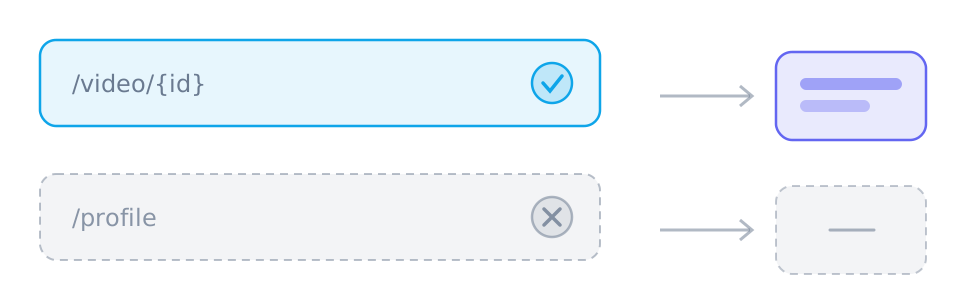
The ordinary post address — the weibo.com/{uid}/{mid} shape the timeline uses — returned nothing when it was tried, and the reason is structural rather than temporary: a timeline-style post page keeps its media inside a player the parser cannot reach, so the page answers while the video stays put. This is why the page above lists three working shapes instead of four. When a paste comes back empty, checking whether the address is a permalink is the first thing worth doing — switching to the video page or the mobile form usually ends the matter.
The three doors open onto the same room: a single MP4 with picture and sound already muxed, and the post's cover image alongside it. That is why the result panel here usually offers one save button and a cover download instead of a pair of lists — the platform packages its videos as finished files, and the panel reflects the packaging rather than reshaping it. No re-encoding happens on the way through: the codec and container on the label are the ones in the file.
The parsers read Weibo the way a stranger with no account does, and much of the platform sits behind doors that stranger cannot open. Friends-only circles, group-only posts and anything behind the login wall return nothing rather than something partial. A deleted post behaves the same way, and region-restricted media adds a border to the list. The empty panel in each case is the wall seen honestly from outside, not a fault in the copy step.
A video reaches the timeline in several positions, and each has its own copying route. An original post carries its video on the post's page. A repost shows the video of the post being reposted, and its own address names the repost — resolving it returns the media the repost carries. Comments can carry videos too, and the mobile status form is usually the shortest route to one. Before pasting, it pays to notice which of these you are actually looking at.
Weibo serves a modest number of renditions per video — commonly a small ladder rather than the wide range of a dedicated video platform — and the panel lists what it was handed, no more and no less. The quality of the saved file is the quality the post's audience was served, which on a busy feed is tuned for phones. Nothing here sharpens, upscales or otherwise improves the source; it copies the file the platform published.
Look at the address before anything else. A post permalink explains the silence on its own; switching to the video page or the mobile status form of the same post resolves most cases without any further troubleshooting.
Open the post in a private window before assuming a fault. What that window cannot play — friends-only, login-walled, deleted or region-held — the parser cannot reach either.
The file is copied stream-for-stream with no re-encoding and no format conversion. The rendition row you select is the rendition that lands on your device.
These tables are shared across the site, so a figure you saw on one page is the figure you see here.
| When the platform… | The result panel shows | What you do |
|---|---|---|
| Serves one finished file | A single track with picture and sound already together | Use the offered save action without merging; completion still requires readable media and a supported browser. |
| Splits picture and sound | Two lists: video-only tracks and audio-only tracks | Choose one complementary track of each kind and merge in a supported browser; phones may have storage or memory limits. |
| Needs relaying or blocks browser reads | The same tracks, routed through a short-lived relay link | YouTube and X use relaying by default; merging chooses a transport automatically. For other single-file results, try the relay button if offered. |
| Task | Desktop | Phone | Why |
|---|---|---|---|
| Download a public link | Depends on source/browser | Depends on source/browser | Requires readable media from a provider; the parser does not inherit your platform login. |
| Download a private, paid or DRM-protected video | No | No | The source never hands the media to an anonymous reader, so there is nothing to copy. |
| Save one track | Depends on source/browser | Depends on source/browser | Requires a readable media file and browser saving support; a manifest alone is not a complete file. |
| Merge two tracks into one MP4 | Depends on source/browser | Depends on source/browser | Uses a save picker or temporary browser storage; browser support, quota and memory determine availability. |
| Convert between formats | No | No | No decoding or re-encoding: single files keep their supplied format, while compatible track pairs can be remuxed into MP4. |
| Remove a watermark | No | No | The file is the platform's own copy; nothing is edited or re-encoded on the way through. |
Verified against live posts: the video page, the player address, the mobile status page and the post permalink of the same video were each resolved, and the working shapes were saved to confirm the single-file outcome. The permalink's silence below is a result that was observed, not a guess about it.
Written and reviewed by SniffVid Team, the people who build and run SniffVid. Guides answer practical questions and are updated as capabilities change. Product promotions are labeled separately. Read the editorial policy
Published · Last reviewed · Content last reviewed
Primary documentation for the claims on this page. Nothing here cites another downloader as an authority on how downloads behave.
Choose another platform page, or try a public media link in the downloader. Availability depends on the parsing service.
SniffVid is an independent tool. It is not affiliated with, endorsed by or sponsored by Weibo Corporation, Weibo or any of their affiliates. All trademarks belong to their respective owners.