SniffVid lists what the parsers can actually reach. If a quality is missing from the list, it is missing at the source: the tool never invents a stream and never upscales a file to a label it has not earned.
What the labels actually describe
A resolution label describes the number of pixels in the frame, not how good the frame looks. How much detail survives movement is decided by the bitrate, which is why a smaller-looking label can sometimes beat a larger one.
- 1080p means 1920×1080; 720p means 1280×720; 480p means 854×480
- The label says nothing about smoothness, sharpness or compression artefacts
- The file size shown beside an entry is the most useful single hint about bitrate
Why the highest quality can be missing
Platforms gate their best renditions. Some formats are reserved for signed-in accounts, some are tied to a subscription, and some are simply not exposed to an anonymous visitor at all. SniffVid parses as an anonymous reader and never asks for credentials.
- Sign-in-only qualities are invisible to any tool that does not hold your account
- Region-locked renditions may be absent while lower ones resolve normally
- Parser coverage changes, so a quality missing today may appear later
What each tier costs you
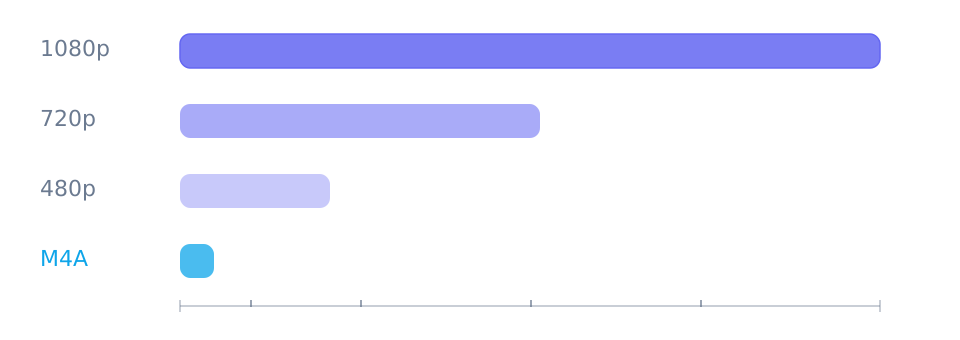
The gap between tiers is larger than most people expect, which is why the newest option is rarely the right default. The figures below are typical ranges for a ten-minute video rather than guarantees, because platforms choose their own bitrates.
- 1080p: roughly 100–300 MB for ten minutes of ordinary footage
- 720p: roughly half of that, and hard to tell apart on a phone screen
- 480p: a fraction of the size, fine for slides, talking heads and note-taking
- Audio only: typically a few megabytes regardless of the length of the video
Choosing for the job at hand
There is no single best answer, because the best file depends on where it will be watched and whether it needs to survive as an archive.
- Something to watch on a phone: the middle of the list, or audio only if the picture is incidental
- Reference material for an edit: the highest resolution offered, in the container the editor prefers
- Archiving your own upload: the highest quality the platform exposes, kept somewhere you control
- Saving data while travelling: a lower tier downloaded in advance beats a higher one that fails on hotel Wi-Fi
Reference
These tables are shared across the site, so a figure you saw on one page is the figure you see here.
| Quality | Typical size (10 min) | Best for |
|---|---|---|
| 1080p | 100–300 MB | Archiving, editing, or watching on a large screen |
| 720p | 50–150 MB | Phones and laptops, and anything that has to download quickly |
| 480p | 20–60 MB | Slides, talking heads and note-taking, where fine detail hardly matters |
| M4A | 5–15 MB | Listening, transcription, or saving data on a long video |
Background and edge cases
Why the same label can look different twice
Two entries at 1080p are not the same file. They may use different encoders, and often do: a platform can publish an H.264 rendition for compatibility and a more efficient codec beside it. The more efficient one packs more detail into fewer bytes, which is why a smaller 1080p file is sometimes the better of the two.
- A label shows frame size, while the codec decides how efficiently it is stored
- Compare like with like: same codec, then same resolution, then size
- The largest entry is not automatically the best-looking one
What the numbers do not tell you
Size and resolution are visible before you download; the encoder's settings are not. Bitrate allocation, keyframe spacing and whether the source is a re-upload are all invisible, and they matter more than the label in fast-moving footage.
- A re-uploaded video has already been through one lossy pass, whatever the label says
- Static scenes hide compression damage; movement and gradations reveal it
- Downloading the next tier up is the only way to compare reliably, and the sizes tell you what that costs
Choosing when the connection is the constraint
On a metered connection the choice reverses: the highest tier you can afford to download now beats the tier you would prefer but cannot finish. Downloading in advance is the whole reason to keep a copy, and a partial file is worth nothing.
- 720p downloads in roughly half the data of 1080p, which matters on mobile plans
- Audio-only is the right tier for anything you will not watch
- A failed download costs the full size of the tier you attempted, not the part that arrived