Usually nothing to join
Where other platforms split picture from sound, an ordinary upload here is served as one progressive file. The panel reflects that: one save button, one cover download, no pair of lists to reconcile.
Paste a Bilibili link and SniffVid asks the parsers for the file behind it. This is the platform where the result usually lands as a single finished MP4 — picture and sound already inside — so the ordinary visit ends with one save and no merging at all.
Illustrations show the workflow. Available formats and tracks depend on the actual result.
SniffVid TeamPublished Last reviewed
Paste a link above to see every available video, audio and cover download.
By using SniffVid you agree to our Terms of Service and Privacy Policy
These points describe the current download workflow. See the page-specific verification note below for what was checked; upstream availability and returned tracks can change.
Where other platforms split picture from sound, an ordinary upload here is served as one progressive file. The panel reflects that: one save button, one cover download, no pair of lists to reconcile.
More parsing services answer for this platform than for any other page in the catalogue, so the failure that a minute of patience fixes is a story this page gets to tell honestly.
The paid tiers of quality are absent rather than downgraded: a logged-out parser receives the ladder as an anonymous visitor, and nothing above the public ceiling appears.
On a video page the address bar holds the BV form; the share sheet offers the b23.tv short code. Both name one video. A space page, a search or the home timeline names many and none.
Drop the link into the box on this page and press Get Download Links. If the first answer is empty, giving it a minute is part of the method here, not a superstition.
The usual result offers one video track with sound already inside — save it directly. On the rarer split result, pick one row from each list and merge on a desktop.
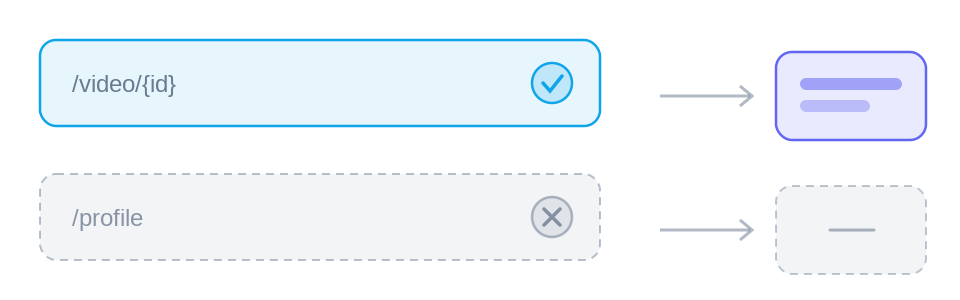
Those are the shapes worth pasting. SniffVid accepts any other public http(s) link too — whether it resolves is up to the source, so a profile, a search page or a private post simply comes back empty.
Public course uploads and talk recordings save as single files, ready for a train ride where the player buffer matters more than the resolution badge.
Keep the rendition you published, before a re-edit or a visibility change rewrites what the page serves.
Cooking, repairs, model builds — a local copy pauses precisely, rewinds without punishment and survives the phone going offline.
Bangumi availability shifts with licensing windows; a saved copy of an episode you were entitled to watch keeps your place in the story.
Across this catalogue, most platform pages have to explain a two-list result before anything else. This is the exception: an ordinary upload is served as a progressive file, muxed at the source, so the panel that comes back has one video track with sound inside, a cover image, and a save action. The split-track workflow exists here only as the occasional outcome, described below for when it appears.
Every ordinary video carries a BV identifier in its address — the form the desktop bar shows. The share sheet instead hands out a b23.tv short code, which is a pointer to that same address and resolves just as well. Around both sit the shapes that hold many videos and resolve to none: a space page is a creator's shelf, a search is a query, and the home feed is an algorithm's mood.
Occasionally a link returns video renditions and audio streams separately — the shape most other platforms wear by default. The response is the standard one: select one row from each list and merge on a desktop browser; a phone saves either track on its own. Nothing about the source changed, only the packaging the parsers were handed.
The sharp end of the quality list — 4K, HDR, the high frame rates — sits behind paid membership, and the parser reads as a visitor with no account. The result is an honest public ceiling: the panel lists everything an anonymous reader can stream and nothing above it, with no downscale standing in for the missing tiers and no warning label explaining the gap.
Episode pages under bangumi and the replays of finished livestreams are, from a parser's seat, ordinary pages that publish finished files — so they often resolve where a broadcast in progress never could. What stays on the far side is the account-tied material: members-only episodes, region-held licensing, and anything the uploader has since withdrawn. The empty panel for those is the wall, not the link.
More parser backends answer for this platform than for any other page here, and they do not fail in step with each other. A request that returns empty has therefore not necessarily reached every service — it reached the ones that answered that time. Letting a minute pass and parsing again regularly lands on a backend that has the video, which is why this page treats the retry as a step rather than an apology.
A BV address with ?p=2 in it names the second part of an upload, and the panel honours the part you gave it. Check which part the address points at before saving, or part one arrives twice.
The order of checks is backwards from most platforms here. Because so many backends answer for this site, an empty result is more likely a missed service than a wall — so parse once more after a minute, and only then reach for the private window.
A progressive result is a single stream written straight to disk — there is no pairing step where a wrong choice could be made and no join where quality could drift. The rendition row you pick is the file you get, codec for codec.
These tables are shared across the site, so a figure you saw on one page is the figure you see here.
| When the platform… | The result panel shows | What you do |
|---|---|---|
| Serves one finished file | A single track with picture and sound already together | Use the offered save action without merging; completion still requires readable media and a supported browser. |
| Splits picture and sound | Two lists: video-only tracks and audio-only tracks | Choose one complementary track of each kind and merge in a supported browser; phones may have storage or memory limits. |
| Needs relaying or blocks browser reads | The same tracks, routed through a short-lived relay link | YouTube and X use relaying by default; merging chooses a transport automatically. For other single-file results, try the relay button if offered. |
| Task | Desktop | Phone | Why |
|---|---|---|---|
| Download a public link | Depends on source/browser | Depends on source/browser | Requires readable media from a provider; the parser does not inherit your platform login. |
| Download a private, paid or DRM-protected video | No | No | The source never hands the media to an anonymous reader, so there is nothing to copy. |
| Save one track | Depends on source/browser | Depends on source/browser | Requires a readable media file and browser saving support; a manifest alone is not a complete file. |
| Merge two tracks into one MP4 | Depends on source/browser | Depends on source/browser | Uses a save picker or temporary browser storage; browser support, quota and memory determine availability. |
| Convert between formats | No | No | No decoding or re-encoding: single files keep their supplied format, while compatible track pairs can be remuxed into MP4. |
| Remove a watermark | No | No | The file is the platform's own copy; nothing is edited or re-encoded on the way through. |
Checked by resolving a BV address, a b23.tv short code and a space page, and by saving an ordinary upload, an episode and a replay — so the one-click outcome described below is what actually happened rather than what the button labels suggest.
Written and reviewed by SniffVid Team, the people who build and run SniffVid. Guides answer practical questions and are updated as capabilities change. Product promotions are labeled separately. Read the editorial policy
Published · Last reviewed · Content last reviewed
Primary documentation for the claims on this page. Nothing here cites another downloader as an authority on how downloads behave.
Choose another platform page, or try a public media link in the downloader. Availability depends on the parsing service.
SniffVid is an independent tool. It is not affiliated with, endorsed by or sponsored by Bilibili Inc., Bilibili or any of their affiliates. All trademarks belong to their respective owners.