Paste a public Snapchat Spotlight link and SniffVid asks the parsers for the file behind it. Snapchat keeps almost everything inside its own app, so Spotlight — the only surface that publishes a real web address — is what decides what this page can and cannot do.
No account needed
Phone and desktop
Public links only
https://www.snapchat.com/spotlight/example
MP4
Illustrations show the workflow. Available formats and tracks depend on the actual result.
SniffVid Team·Published ·Last reviewed
Paste a link above to see every available video, audio and cover download.
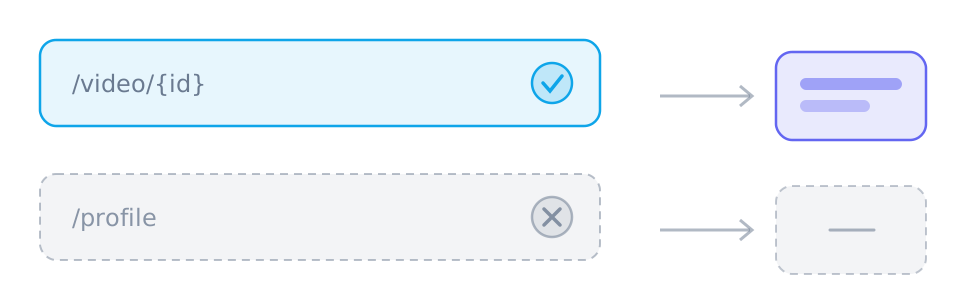
Spotlight is the only Snapchat surface with a web address you can paste. Snaps, Stories, Chats and Memories have no public URL, so there is nothing a link-based tool can read.
Spotlight clips are vertical and short, and usually arrive as one finished file. Separate video and audio tracks are the exception here, not the rule.
What the parser returns is what you save — no upscaling, no re-encoding, no watermark removal, and no restoring of a quality the source never offered.
Playback in the app is not evidence of accessibility. Spotlight entries are moderated, rotated and sometimes region-limited, so a public-looking link can still come back empty.
These points describe the current download workflow. See the page-specific verification note below for what was checked; upstream availability and returned tracks can change.
What downloading from Snapchat involves
Spotlight or nothing
Snapchat is deliberately app-first: a Snap vanishes after viewing, a Story expires, and Chats and Memories sit behind an account. Spotlight is curated for a public audience and publishes a real address, which is why it is the only thing here.
Vertical, short and usually whole
Spotlight clips are 9:16 and capped at a minute, and Snapchat normally serves them finished — picture and sound already together. Most results end with a single save rather than a merge.
Nothing edited on the way out
This page relays files, it does not make them. A high resolution nobody offered cannot be created, an overlay stays where the creator put it, and a thumbnail is a cover rather than an image download.
How to copy a link from Snapchat
S
Snapchat
https://www.snapchat.com/spotlight/example
Link copied
1
Take the address from the share sheet
Open the Spotlight clip, tap Share and choose Copy link. If Snapchat offers only in-app recipients and no link, that clip has no public address and there is nothing to paste.
2
Paste it and read what comes back
Paste the address above and press Get Download Links. An empty result is usually about access — the entry may have been removed, or the parser may not have been able to reach it — not about how you copied it.
3
Save the file you were given
One finished file saves directly. If complementary video and audio tracks are returned instead, select both and merge them in a desktop browser; a phone can save each track on its own.
Which links work best
Those are the shapes worth pasting. SniffVid accepts any other public http(s) link too — whether it resolves is up to the source, so a profile, a search page or a private post simply comes back empty.
snapchat.com/spotlight/{id}
What people save from Snapchat
A Spotlight clip you published
Your own submission can be rotated out of the feed or pulled by moderation. A local file is not subject to either.
Something public before it rotates
Spotlight surfaces change constantly. Saving what you have permission to keep is the only way to see it again later.
Short clips worth keeping offline
Vertical and under a minute is exactly the shape worth having on a device instead of streaming on somebody else's network.
Material that has to stay quotable
Save what you have the rights to use, then review or quote it from your own disk, where a removed entry cannot change under you.
Why Spotlight is the only thing here
Snapchat is built app-first, and most of its content simply has no address. A Snap disappears after being viewed, a Story expires after a day, a Chat message sits behind two accounts, and Memories are private by default. None of them can be handed to a parser, because there is no public page for a parser to open. Spotlight is the exception: it is curated for a public audience and publishes a real web address. That fact — not a preference of ours — decides where this page's boundary is.
Which Snapchat addresses can be pasted
The share sheet decides this, and there is no way around it. Tap Share on a Spotlight clip and Snapchat offers a link you can copy; tap Share on most other surfaces and it offers recipients instead. Where no link is offered there is no address for a browser-based tool to open, and pasting a profile, a lens result or a Discover hub comes back empty because none of them is one video.
snapchat.com/spotlight/{id} — an individual public Spotlight clip
A profile, a lens or a Discover hub — many videos at once, so nothing to resolve
The address decides the outcome. A post, video or reel carries media; a profile, board or search page has nothing to return.
What the result panel usually shows
Because Spotlight clips are short and vertical, Snapchat commonly serves one finished MP4 with picture and sound already together, so the ordinary outcome is a single save. The other outcome is the familiar one from elsewhere in this catalogue: separate video and audio tracks, which have to be selected together and merged. Which of the two you get is decided by the source, never by this page.
One complete file — save it directly
Separate video and audio — select both, merge in a desktop browser
No media rows at all — this particular clip could not be read
Streaming playlists are not files
A parse occasionally returns an HLS (.m3u8) or DASH (.mpd) playlist. That is a text index pointing at thousands of small segments rather than a finished video: it will not play offline and it cannot be saved as one file. Since this workflow does not assemble playlists into MP4s, a manifest-only result counts as no usable file rather than as a partial win.
Why a working link can still return nothing
Playing something inside the Snapchat app and reading it from a URL are different operations. The app authenticates you, streams from a signed session and can surface entries the public web version refuses to serve. On top of that, Spotlight entries are moderated and rotated, some are region-limited or age-gated, and the parsing service itself can be rate-limited. An empty result therefore says something about access, not about whether the clip exists.
The entry was removed, moderated or limited to another region
The clip was never published as a public Spotlight entry
The parsing service was rate-limited or could not reach the source
What this page deliberately does not do
Several things visitors arrive expecting are out of scope, and naming them is more useful than failing quietly. There is no way into private content, no way around an age gate or a login wall, no bulk archive of somebody's profile, and no editing of the returned media — no upscaling, no re-encoding, no watermark removal and no soundtrack swap.
Private Snaps, Chats, Memories and expiring Stories
Profile archives, whole Spotlight feeds and Stories highlights
Upscaling, transcoding, watermark removal or replacing the audio
Background and limits
If the share sheet offers no link
Then that clip has no public address, and no tool that reads URLs can help with it. This is how Snapchat is built rather than a limitation of any particular parser.
Generated links expire
Media links from SniffVid expire after fifteen minutes, so parse again if one has gone cold. When the source itself is unavailable, re-parsing will not change the outcome.
Vertical stays vertical
Spotlight clips are 9:16 and about a minute long, and they are saved exactly as the source served them — no cropping, rotating, reframing or added borders.
Reference
These tables are shared across the site, so a figure you saw on one page is the figure you see here.
How to read the result panel, by the way the platform serves its media
When the platform…
The result panel shows
What you do
Serves one finished file
A single track with picture and sound already together
Use the offered save action without merging; completion still requires readable media and a supported browser.
Splits picture and sound
Two lists: video-only tracks and audio-only tracks
Choose one complementary track of each kind and merge in a supported browser; phones may have storage or memory limits.
Needs relaying or blocks browser reads
The same tracks, routed through a short-lived relay link
YouTube and X use relaying by default; merging chooses a transport automatically. For other single-file results, try the relay button if offered.
What works, on what device, and why
Task
Desktop
Phone
Why
Download a public link
Depends on source/browser
Depends on source/browser
Requires readable media from a provider; the parser does not inherit your platform login.
Download a private, paid or DRM-protected video
✗No
✗No
The source never hands the media to an anonymous reader, so there is nothing to copy.
Save one track
Depends on source/browser
Depends on source/browser
Requires a readable media file and browser saving support; a manifest alone is not a complete file.
Merge two tracks into one MP4
Depends on source/browser
Depends on source/browser
Uses a save picker or temporary browser storage; browser support, quota and memory determine availability.
Convert between formats
✗No
✗No
No decoding or re-encoding: single files keep their supplied format, while compatible track pairs can be remuxed into MP4.
Remove a watermark
✗No
✗No
The file is the platform's own copy; nothing is edited or re-encoded on the way through.
Snapchat questions
The share address of one Spotlight clip, in the form snapchat.com/spotlight/{id}. If Snapchat's share sheet offers no link for what you are looking at, that clip has no public address to paste here.
No. Those live inside the app and deliberately have no public web address. Spotlight is the only Snapchat surface this page works with, which is a property of Snapchat rather than a setting that can be turned on here.
Spotlight submissions run up to 60 seconds and are vertical, so files are usually small — tens rather than hundreds of megabytes. The exact size follows whatever the parser was handed.
SniffVid is free to use without registration or installation. Upstream availability and request limits still apply; not every public link returns a downloadable file.
Usually not. Spotlight clips are normally served as one finished file with both already together. Only when the result shows two complementary tracks do you select both and merge them, which needs a desktop browser.
Moderation, rotation and regional availability all change what is reachable from outside the app, and the parsing service may be rate-limited. An empty result describes access at that moment, not whether the clip exists.
No. Bulk archives, whole Spotlight feeds and Stories highlights are outside this workflow, even when each individual clip would resolve on its own.
An HLS (.m3u8) or DASH (.mpd) playlist is a text index of segments rather than a finished video, so it cannot be saved as one file or played offline. A manifest-only result counts as no usable file.
How this was checked
How this was checked
Reviewed against the current Spotlight-facing parsers and the result panel, alongside Snapchat's published Spotlight submission rules. Because entries are moderated and rotated, this page says which surface is addressable rather than claiming a success rate for every public link.
·The page-specific note states which behavior was reviewed and which live samples, if any, were tested.
·Track availability depends on the parsing service. Table sizes are illustrative ranges, not measurements of every video.
·A source may change or restrict access; the result panel is the reference for the current link.
Who maintains it
Written and reviewed by SniffVid Team, the people who build and run SniffVid. Guides answer practical questions and are updated as capabilities change. Product promotions are labeled separately. Read the editorial policy
SniffVid is an independent tool. It is not affiliated with, endorsed by or sponsored by Snap Inc., Snapchat or any of their affiliates. All trademarks belong to their respective owners.