Nothing to merge
Every other page in this catalogue has to explain what to do when picture and sound arrive separately. SoundCloud has no picture, so that whole step disappears: one recognised track, one save.
Paste a public SoundCloud track link and SniffVid asks the parsers for the audio behind it. SoundCloud is the only platform here with no picture at all, and that quietly changes this whole page: there is no video track, no resolution to choose, and nothing to merge.
Illustrations show the workflow. Available formats and tracks depend on the actual result.
SniffVid TeamPublished Last reviewed
Paste a track link above to request available audio. Format and quality depend on the source.
By using SniffVid you agree to our Terms of Service and Privacy Policy
These points describe the current download workflow. See the page-specific verification note below for what was checked; upstream availability and returned tracks can change.
Every other page in this catalogue has to explain what to do when picture and sound arrive separately. SoundCloud has no picture, so that whole step disappears: one recognised track, one save.
The panel offers Save audio rather than a list of qualities, and the cover artwork may come with the track. Picking a resolution is not part of this workflow.
What arrives is whatever SoundCloud served — commonly an MP3 or AAC stream at the quality it offers a listener. Nothing here re-encodes it.
Open the track and copy its soundcloud.com/{artist}/{track} URL, parameters included. An artist profile, an album and a playlist each hold many tracks and point at none of them.
Paste it above and press Get Download Links. An empty result usually means the track itself is restricted rather than that the link was copied wrongly.
Use Save audio file on the recognised track, on a phone as well as a desktop. Keep the format you were given; nothing here converts it.
Those are the shapes worth pasting. SniffVid accepts any other public http(s) link too — whether it resolves is up to the source, so a profile, a search page or a private post simply comes back empty.
Keep your own release as a file, independently of the upload staying on the platform.
A finished audio file on your own device is worth more than a stream you have to go and find again.
SoundCloud carries DJ sets, podcasts and long-form uploads, which is exactly what you want on a device rather than streaming.
Save what you have the rights to use, then listen on your own disk, where a takedown cannot silence it.
Every other platform in this catalogue is a video platform, which is why they all share one section: what to do when picture and sound arrive as separate tracks. SoundCloud has no picture at all. There is no video row, no resolution ladder, no merge step, and no reason to reach for a desktop browser before saving. What replaces all of it is a single question — whether the track was recognised, and what it came back as.
Paste the address of one track. The soundcloud.com/{artist}/{track} form is what the share button gives you, and it is worth pasting exactly as it came, parameters included. An artist profile, an album, a playlist and a repost each point at many tracks, so none of them identifies one piece of audio.
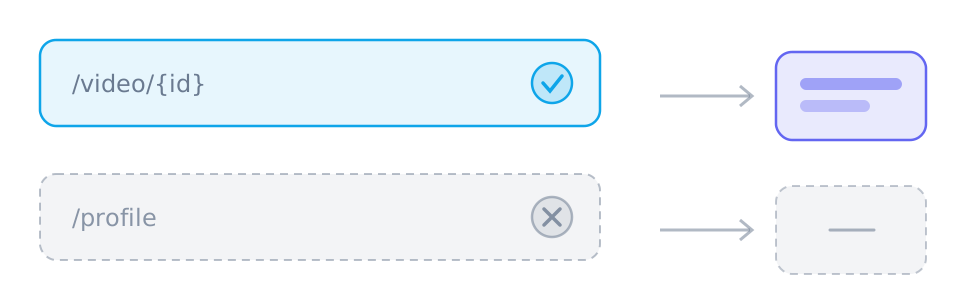
When a track is recognised the panel offers Save audio, and the cover artwork may be offered beside it. There is no list of resolutions to pick from, because SoundCloud serves one audio stream rather than several video renditions. Occasionally the only thing returned is a segmented streaming playlist, which is an index rather than a file and counts as no usable audio here.
Playing a track in your browser is not the same as being able to fetch it. Some uploads are private or only reachable to followers, some are Go+ or subscriber-only, and a growing number are offered as a short preview rather than the whole thing. On top of that, SoundCloud enforces copyright takedowns aggressively, so a track that was available last month may simply be gone.
What you get is what SoundCloud served. Public streaming is usually delivered as MP3 or AAC at the quality SoundCloud offers a listener, rather than the file the artist uploaded — and whether a download is offered at all is the artist's own setting on their own upload. So there is no quality selector here, and nothing to gain by asking twice: the answer stays the same until the source changes what it serves.
SoundCloud attracts a specific set of expectations, and naming them is more useful than failing quietly. There is no conversion to MP3 or any other format, no restoration of an original upload that SoundCloud never served publicly, no way to turn a preview into the full track, and no archive of a profile, album or playlist.
A preview saves perfectly well and is simply short. If the file is much shorter than the track should be, you were served a preview rather than the full upload.
Media links from SniffVid expire after fifteen minutes, so parse again if one has gone cold. When SoundCloud itself will not serve the track, re-parsing will not change the outcome.
The audio is saved exactly as the source served it — no re-encoding, no format conversion, and no quality that was never on offer.
These tables are shared across the site, so a figure you saw on one page is the figure you see here.
| Task | Desktop | Phone | Why |
|---|---|---|---|
| Download a public link | Depends on source/browser | Depends on source/browser | Requires readable media from a provider; the parser does not inherit your platform login. |
| Download a private, paid or DRM-protected video | No | No | The source never hands the media to an anonymous reader, so there is nothing to copy. |
| Save one track | Depends on source/browser | Depends on source/browser | Requires a readable media file and browser saving support; a manifest alone is not a complete file. |
| Merge two tracks into one MP4 | Depends on source/browser | Depends on source/browser | Uses a save picker or temporary browser storage; browser support, quota and memory determine availability. |
| Convert between formats | No | No | No decoding or re-encoding: single files keep their supplied format, while compatible track pairs can be remuxed into MP4. |
| Remove a watermark | No | No | The file is the platform's own copy; nothing is edited or re-encoded on the way through. |
Reviewed the current audio-track handling and the Save audio action in the result panel, alongside the track address shape SoundCloud issues. Because there is no video track to reason about, this page describes what the panel does with the audio it recognises rather than promising a file for every track.
Written and reviewed by SniffVid Team, the people who build and run SniffVid. Guides answer practical questions and are updated as capabilities change. Product promotions are labeled separately. Read the editorial policy
Published · Last reviewed · Content last reviewed
Primary documentation for the claims on this page. Nothing here cites another downloader as an authority on how downloads behave.
Choose another platform page, or try a public media link in the downloader. Availability depends on the parsing service.
SniffVid is an independent tool. It is not affiliated with, endorsed by or sponsored by SoundCloud, Inc., SoundCloud or any of their affiliates. All trademarks belong to their respective owners.