Skip to content
Tutorial

How to fix expired download links

Expiry keeps a resolved address from being forwarded later or hot-linked elsewhere. The practical consequence is that an open result panel is a window, not a download queue.

  • No account needed
  • Phone and desktop
  • Public links only

SniffVid TeamPublished Last reviewed

Bot protection

Paste a link above to see every available video, audio and cover download.

By using SniffVid you agree to our Terms of Service and Privacy Policy

The short answer

  • Media addresses expire roughly fifteen minutes after parsing, and the panel shows the exact time.
  • The countdown refreshes every thirty seconds, so the panel can trail the real expiry slightly.
  • There is no renewal: a new address requires a new parse of the same link.
  • The page credential issued by the check lasts thirty minutes, which is usually longer than the media addresses.

These points describe the current download workflow. See the page-specific verification note below for what was checked; upstream availability and returned tracks can change.

A laptop, tablet, headphones and translucent media tiles arranged on a navy workbench.
Concept illustration of an offline media library, not a product screenshot. The returned media determines what can be saved.

Step by step

Follow the controls actually offered by the result panel; formats and browser capabilities can vary.

  1. 1

    Read the countdown before you start

    The panel states when the links expire. On a slow connection start with the track you actually need, because a large merge begun near the end of the window can run past it.

  2. 2

    Tell the two expiries apart

    When the media addresses are gone, the panel offers Parse another link. When the page credential is gone instead, the next press re-runs the check on its own and then parses as usual.

  3. 3

    Parse again and continue

    Re-parsing returns new addresses for the same tracks. Files already saved stay saved; a merge that was cut off has to be started again from the new result.

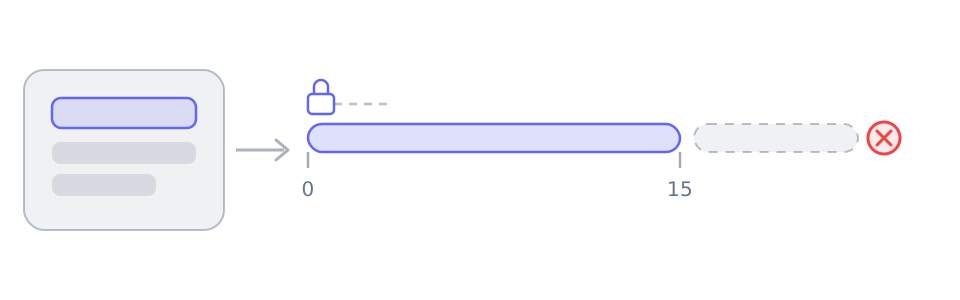
A result panel handing out a sealed address that stays valid from 0 to 15, followed by a dashed section crossed out.
The addresses arrive sealed and short-lived: usable from the moment of parsing until the minute the panel shows, and dead after that. Nothing renews them — parsing again issues a new set.

Two different clocks are running at once: the media addresses and the page credential. Knowing which one ran out tells you whether a single re-parse is enough.

Reference

These tables are shared across the site, so a figure you saw on one page is the figure you see here.

How to read the result panel, by the way the platform serves its media
When the platform…The result panel showsWhat you do
Serves one finished fileA single track with picture and sound already togetherUse the offered save action without merging; completion still requires readable media and a supported browser.
Splits picture and soundTwo lists: video-only tracks and audio-only tracksChoose one complementary track of each kind and merge in a supported browser; phones may have storage or memory limits.
Needs relaying or blocks browser readsThe same tracks, routed through a short-lived relay linkYouTube and X use relaying by default; merging chooses a transport automatically. For other single-file results, try the relay button if offered.
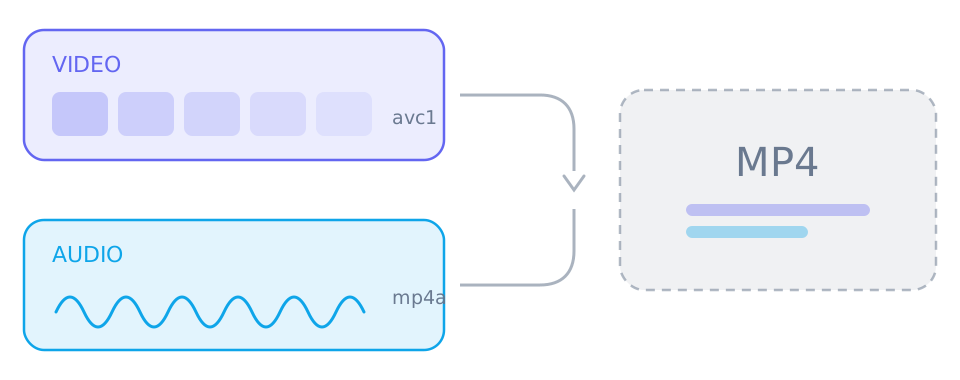
A video-only stream and an audio-only stream joining into a single MP4 file.
A platform that offers several resolutions stores picture and sound separately. Taking both and merging them gives you one file; saving only the top box gives you a silent one.

Frequently asked questions

No, and the panel cannot either. Parsing the link again issues a new set of addresses.

No. The addresses are short-lived and tied to that one resolve. Share the page instead.

A limited lifetime stops a resolved address from being reused or hot-linked later, and it keeps the tool from acting as a file host.

An unfinished merge is not a complete MP4. Discard it, parse again and merge once more.

How this was checked

How this was checked

Reviewed against the current result panel, its expiry handling and the media endpoint. Network speed and source behaviour vary; this is a code-based review, not a claim of testing every connection.

  • The page-specific note states which behavior was reviewed and which live samples, if any, were tested.
  • Track availability depends on the parsing service. Table sizes are illustrative ranges, not measurements of every video.
  • A source may change or restrict access; the result panel is the reference for the current link.

Who maintains it

Written and reviewed by SniffVid Team, the people who build and run SniffVid. Guides answer practical questions and are updated as capabilities change. Product promotions are labeled separately. Read the editorial policy

Published · Last reviewed · Content last reviewed

Keep reading

Other tutorials, and the tool pages for the sites people download from most.

Tool pages for the biggest platforms

Dedicated pages combine the downloader with platform-specific link instructions and limits. Choose one below.