Paste the message, not just the link
Douyin's share sheet copies a caption with a short link buried in it. The input pulls the first address out of that text, so you can paste the whole thing exactly as the app handed it to you.
Paste a Douyin share message or a video link and SniffVid takes the first address out of it and asks the parsers for the file behind that address. Douyin already has a save button — the reason people look past it is that its file carries a watermark, and some creators switch saving off altogether.
Illustrations show the workflow. Available formats and tracks depend on the actual result.
SniffVid TeamPublished Last reviewed
Paste a link above to see every available video, audio and cover download.
By using SniffVid you agree to our Terms of Service and Privacy Policy
These points describe the current download workflow. See the page-specific verification note below for what was checked; upstream availability and returned tracks can change.
Douyin's share sheet copies a caption with a short link buried in it. The input pulls the first address out of that text, so you can paste the whole thing exactly as the app handed it to you.
Douyin can save a video to your camera roll, but the file carries the platform watermark and a creator can switch saving off entirely. What comes back here is the source file — which is also why the watermark comes with it.
Douyin typically serves picture and sound already together, so the common result is a single save. Two complementary tracks are rarer here than on platforms that always split them.
Tap Share beside the video and choose Copy link. The clipboard will hold a caption with a v.douyin.com short link inside it — paste all of it, because the input finds the address for you.
Paste it above and press Get Download Links. An empty result means the parser could not get media for that post, which is usually about the post rather than about how you copied it.
One finished file saves directly, on a phone as well as a desktop. If complementary video and audio tracks come back instead, select both and merge them in a desktop browser.
Those are the shapes worth pasting. SniffVid accepts any other public http(s) link too — whether it resolves is up to the source, so a profile, a search page or a private post simply comes back empty.
Keep your own work as a file that does not depend on the account staying public or the post staying up.
Some creators disable saving inside the app. Where the parser can still read the public post, this is a way to keep a copy you were not otherwise offered.
Vertical and short is exactly the shape worth having on a device instead of streaming on somebody else's network.
Save what you have the rights to use, then review it on your own disk, where an edited or removed post cannot change what you saw.
Douyin can save a video to your phone, and for a lot of posts that is enough. It falls short in two ways: the saved file carries the platform's watermark and end-of-video branding, and a creator can switch saving off for their own posts, leaving no button to press at all. That is the gap people arrive here hoping to close — and it is worth being straight about how much of it this page closes. What comes back is the media the parser received, so if the watermark is part of that file, it stays.
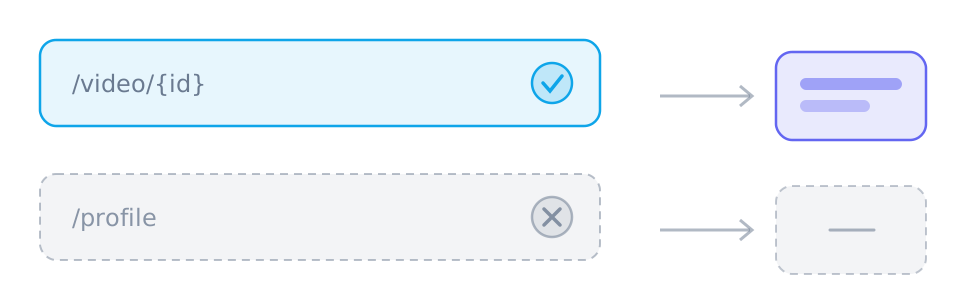
The share sheet copies a caption with a short link inside it, and either works: paste the whole message, or just the address on its own. What matters is that it points at one video post. A creator page, a hashtag page and a live-stream address do not, so all three come back empty.
Douyin typically serves one finished file with picture and sound already together, so the ordinary outcome is a single save — and unlike merging, that works on a phone too. When two complementary tracks come back instead, they have to be selected together and merged, which needs a desktop browser. Which shape arrives depends on what the parser was handed.
A post being visible to you is not the same as its media being fetchable. Live streams have no finished file, friends-only and private accounts are not public addresses, and image-only posts carry no video at all. On top of that the parsing services get rate-limited, and Douyin changes its own delivery often enough that a shape which worked last month may not work today.
Expectations worth naming before they turn into a wasted visit. Overlays are not removed, so a Douyin watermark stays; quality is not invented, so only what the parser received can be saved; and there is no way into private or friends-only posts, no live-stream capture, and no bulk download of a creator's catalogue.
On 24 October 2026 one Douyin sample was parsed through both Xiaolvfang and NoLogo, and each returned a media URL that responded with MP4 content. That is a single post rather than a survey of the platform, and it says nothing about how every creator setting or short-link variant behaves — which is why the copy above describes what the panel does with a result rather than promising that one.
If the media the parser receives carries Douyin's overlay, the saved file carries it too. Nothing here strips it, and a tool that claims to is usually re-encoding rather than downloading.
Media links from SniffVid expire after fifteen minutes, so parse again if one has gone cold. If Douyin itself will not serve the post, re-parsing will not change the outcome.
Douyin posts are 9:16. Files are saved exactly as the source served them — no cropping, rotating, reframing or added borders.
These tables are shared across the site, so a figure you saw on one page is the figure you see here.
| When the platform… | The result panel shows | What you do |
|---|---|---|
| Serves one finished file | A single track with picture and sound already together | Use the offered save action without merging; completion still requires readable media and a supported browser. |
| Splits picture and sound | Two lists: video-only tracks and audio-only tracks | Choose one complementary track of each kind and merge in a supported browser; phones may have storage or memory limits. |
| Needs relaying or blocks browser reads | The same tracks, routed through a short-lived relay link | YouTube and X use relaying by default; merging chooses a transport automatically. For other single-file results, try the relay button if offered. |
| Task | Desktop | Phone | Why |
|---|---|---|---|
| Download a public link | Depends on source/browser | Depends on source/browser | Requires readable media from a provider; the parser does not inherit your platform login. |
| Download a private, paid or DRM-protected video | No | No | The source never hands the media to an anonymous reader, so there is nothing to copy. |
| Save one track | Depends on source/browser | Depends on source/browser | Requires a readable media file and browser saving support; a manifest alone is not a complete file. |
| Merge two tracks into one MP4 | Depends on source/browser | Depends on source/browser | Uses a save picker or temporary browser storage; browser support, quota and memory determine availability. |
| Convert between formats | No | No | No decoding or re-encoding: single files keep their supplied format, while compatible track pairs can be remuxed into MP4. |
| Remove a watermark | No | No | The file is the platform's own copy; nothing is edited or re-encoded on the way through. |
Checked on 24 October 2026 by parsing one Douyin sample through Xiaolvfang and NoLogo; both returned a media URL that responded with MP4 content. That is a single post rather than a survey, so this page describes what the panel does with a result instead of promising that format for every post.
Written and reviewed by SniffVid Team, the people who build and run SniffVid. Guides answer practical questions and are updated as capabilities change. Product promotions are labeled separately. Read the editorial policy
Published · Last reviewed · Content last reviewed
Primary documentation for the claims on this page. Nothing here cites another downloader as an authority on how downloads behave.
Choose another platform page, or try a public media link in the downloader. Availability depends on the parsing service.
SniffVid is an independent tool. It is not affiliated with, endorsed by or sponsored by Beijing Douyin Information Service Co., Ltd., Douyin or any of their affiliates. All trademarks belong to their respective owners.