Tutorial

Video download tutorials

Every article here answers one question: how to download from a site, how to finish a step your device got stuck on, or what to do when a download came back wrong. Each one carries the working downloader, a dated byline and the limits that actually apply.

  • No account needed
  • Phone and desktop
  • Public links only

By SniffVid Team · 13 tutorials · Last reviewed

Bot protection

Paste a link above to see every available video, audio and cover download.

All tutorials, newest first

Platform guides cover the sites that do not have a page of their own. How-tos cover the device, the symptom or the missing step.

  1. How-to

    How to download a video from any website

    The three steps that cover any public link, and what to check when a specific site returns nothing.

  2. Platform guide

    How to download Douyin videos

    A whole share message works as well as a bare link, and which posts cannot be reached at all.

  3. Platform guide

    How to download Xiaohongshu videos and images

    Copy the note link or the xhslink.com short form to save the video and the original images. Notes behind a login cannot be resolved.

  4. Platform guide

    How to download Threads videos

    One post, one video: which Threads link to paste, on either of the two domains the app uses.

  5. How-to

    How to choose the video quality you download

    What the resolution labels mean, why the sharpest option costs the most data, and when the smaller file is the better one.

  6. Platform guide

    How to download Pinterest videos and images

    Copy a Pin link or the short pin.it form, and get the video or the original image behind it.

  7. How-to

    Why your video downloaded without sound

    A silent file is usually not a broken download. Here are the four causes, and how to tell which one you have.

  8. Platform guide

    How to download a Reddit video with sound

    Reddit serves video and audio apart, so the merge is not optional here. Which link to copy, and how to get sound in the file.

  9. How-to

    How to download only the audio from a video

    Keep the sound and leave the picture behind — for listening, note-taking or a transcription tool.

  10. Platform guide

    How to download Instagram videos and Reels

    Which link to copy from a Reel, a post or a feed video, and why a private account returns nothing.

  11. Platform guide

    How to download Facebook videos

    Which Facebook link works, and why a post set to Friends or Only me comes back empty.

  12. How-to

    How to save a downloaded video to Photos on iPhone

    Where a saved file actually lands on iOS, how to move it into your camera roll, and the one step a phone cannot finish.

  13. How-to

    How to merge video and audio into one MP4

    Why a YouTube or TikTok link comes back as two streams, and how to join them without a server touching your file.

Reference

These tables are shared across the site, so a figure you saw on one page is the figure you see here.

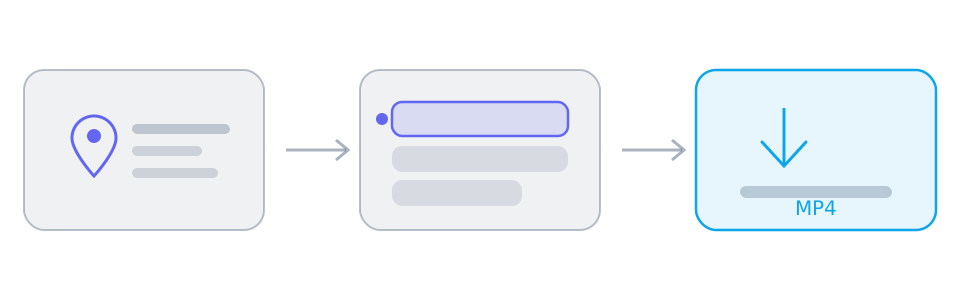
Three panels showing a video link, a list of available tracks, and the saved file.
Every download follows the same three stages: paste a link, choose from the tracks the parsers return, then save. The middle panel is where the decision happens.
How to read the result panel, by the way the platform serves its media
When the platform…The result panel showsWhat you do
Serves one finished fileA single track with picture and sound already togetherSave it. Nothing needs merging, on any device.
Splits picture and soundTwo lists: video-only tracks and audio-only tracksSelect one of each, then merge on a desktop browser.
Blocks direct browser readsThe same tracks, routed through a short-lived relay linkNothing on your side: SniffVid switches to the relay by itself.
Which address shape carries the media, platform by platform
Address shapeResolvesWhy
instagram.com/reel/{id}YesA Reel or a post carries exactly one piece of media. A profile does not.
facebook.com/watch/?v={id}YesWatch videos, Reels and page videos all resolve; the audience setting still has the final say.
reddit.com/r/{sub}/comments/{id}/…YesThe permalink under the post is what carries the media, and v.redd.it serves it as two streams.
pinterest.com/pin/{id}YesA Pin resolves to a video, to a still image, or to a link onwards that has no media of its own.
threads.com/@{user}/post/{id}YesOne post, one video. Both the current and the older hostname work.
xiaohongshu.com/explore/{id}YesA note resolves, and the short form the app shares redirects to it.
douyin.com/video/{id}YesThe share message contains the link, and the whole message can be pasted.
youtube.com/watch?v={id}YesA watch address resolves; a channel page or a search result has no single video.
tiktok.com/@{user}/video/{id}YesA video address resolves; a profile does not.
bilibili.com/video/BV…YesA BV address resolves; a space page does not.
x.com/{user}/status/{id}YesA status address resolves; a profile timeline does not.
/{user} · /profile · /searchNoProfiles, boards, channels, search results and home feeds have no single piece of media behind them.
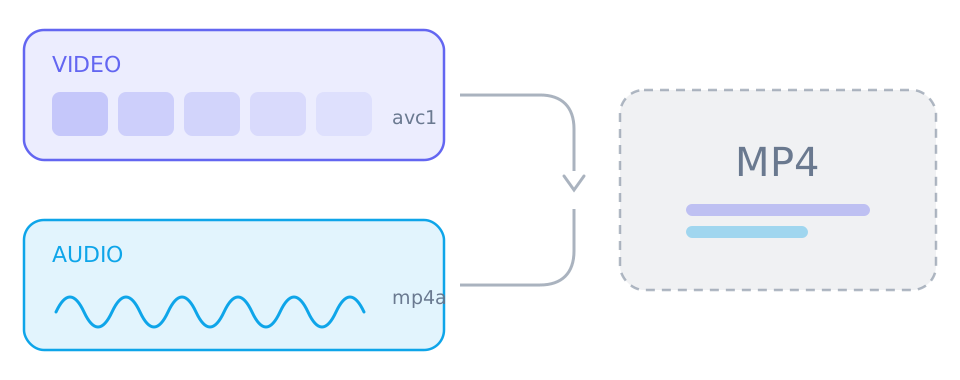
A video-only stream and an audio-only stream joining into a single MP4 file.
A platform that offers several resolutions stores picture and sound separately. Taking both and merging them gives you one file; saving only the top box gives you a silent one.

What happens between pasting a link and saving a file

Your browser sends the address to a Cloudflare Worker, which asks a set of parsing services for the media streams behind that page. What comes back is a list of tracks — sometimes one finished file, sometimes picture and sound kept apart — each wrapped in an encrypted token. Only when you press save does the media move, and it moves from the source to your device.

  • The link you paste is not stored, and the Worker holds no queue of downloads
  • Every media address expires fifteen minutes after it is issued
  • When a platform splits its streams, the merge happens in your browser rather than on a server

How to read these tutorials

Each article is dated, because a platform that changes how it serves video can make a page stale. The published date is when the article first went live and the review date is the last time the steps were checked against the tool, so you can tell how current the advice is before you follow it.

  • Platform guides start with the link to copy, because that is the step people get wrong
  • How-tos start with the symptom or the device that caused the problem
  • Every article names what it will not do, so a limit is not mistaken for a bug

What these tutorials will not claim

SniffVid does not remove watermarks, does not decrypt DRM-protected streams, does not convert between formats and cannot reach anything behind a login. Where a tutorial says a step will not work on your device, that is a real limit of the browser rather than a temporary fault — and it is better to know before you start.

  • Private, friends-only, members-only and region-locked videos cannot be resolved
  • A quality that is missing from the list is missing at the source, not filtered by us
  • On a phone you save a single track; merging two streams needs a desktop browser

Tool pages for the biggest platforms

YouTube, TikTok, Bilibili and X each have a landing page with the downloader built in and the notes that apply to that site alone.

Content last reviewed