Instagram serves its media in the shape most downloaders handle worst: Reels usually arrive as separate picture and sound, and a carousel mixes video with stills. The steps below cover the link first, because that is where most attempts fail.
Which Instagram link to copy
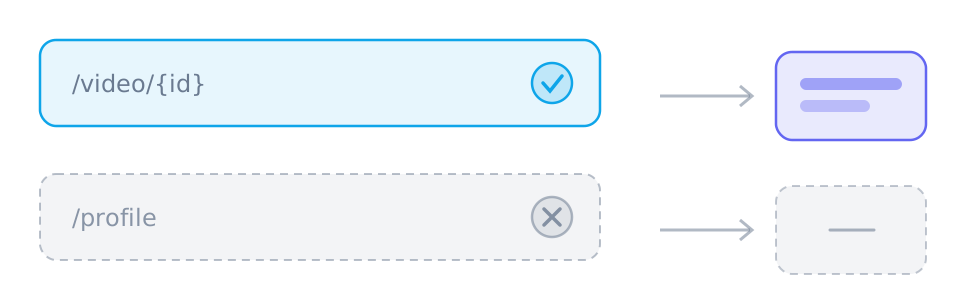
A post address resolves, a profile does not. The link the app hands you from the share sheet is the safest thing to paste, and editing it to shorten it is usually the step that breaks it.
- instagram.com/reel/{id} — a Reel
- instagram.com/p/{id} — a photo or video post, including a carousel
- A personal profile, an explore page or a search result has no single video to return
Reels arrive as two tracks
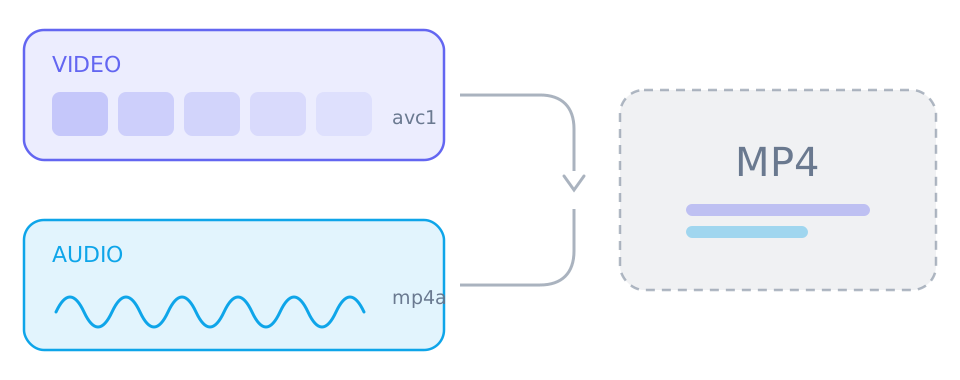
Like YouTube and TikTok, Instagram keeps Reel picture and sound apart so it can serve them on demand. A video-only track saved on its own is silent, which is the most common complaint about Reels downloads.
- Select a video track and an audio track before saving
- Merging both into one MP4 needs a desktop browser
- A carousel post may list several items; save them one at a time
What Instagram will not give up
Anything that needs a session cannot be parsed: the parsers behind SniffVid see the same page an anonymous visitor does, so a login wall is the end of the road rather than something to work around.
- Private accounts and followers-only posts return nothing
- Stories expire and are not reachable without a session
- Region-restricted or age-gated posts may be unavailable where the parser runs
Reference
These tables are shared across the site, so a figure you saw on one page is the figure you see here.
| Address shape | Resolves | Why |
|---|---|---|
| instagram.com/reel/{id} | Yes | A Reel or a post carries exactly one piece of media. A profile does not. |
| facebook.com/watch/?v={id} | Yes | Watch videos, Reels and page videos all resolve; the audience setting still has the final say. |
| reddit.com/r/{sub}/comments/{id}/… | Yes | The permalink under the post is what carries the media, and v.redd.it serves it as two streams. |
| pinterest.com/pin/{id} | Yes | A Pin resolves to a video, to a still image, or to a link onwards that has no media of its own. |
| threads.com/@{user}/post/{id} | Yes | One post, one video. Both the current and the older hostname work. |
| xiaohongshu.com/explore/{id} | Yes | A note resolves, and the short form the app shares redirects to it. |
| douyin.com/video/{id} | Yes | The share message contains the link, and the whole message can be pasted. |
| youtube.com/watch?v={id} | Yes | A watch address resolves; a channel page or a search result has no single video. |
| tiktok.com/@{user}/video/{id} | Yes | A video address resolves; a profile does not. |
| bilibili.com/video/BV… | Yes | A BV address resolves; a space page does not. |
| x.com/{user}/status/{id} | Yes | A status address resolves; a profile timeline does not. |
| /{user} · /profile · /search | No | Profiles, boards, channels, search results and home feeds have no single piece of media behind them. |
Which links work best
- instagram.com/reel/{id}
- instagram.com/p/{id}
Those are the shapes worth pasting. SniffVid accepts any other public http(s) link too — whether it resolves is up to the source, so a profile, a search page or a private post simply comes back empty.
Background and edge cases
Reels, feed videos and carousels are three cases
They look similar in the app and behave differently in a result panel. A Reel is one piece of media split across two streams; a feed video may be a single finished file; a carousel is a set, and only some of its items may be video.
- A Reel: select one video track and one audio track, then merge
- A feed video: often a single file, so saving is one click
- A carousel: several entries, each saved on its own
Why the audience setting decides everything
Instagram decides what a page shows before it is served, and a parser is an anonymous visitor. A private account or a followers-only post is therefore not a download that failed but a page that was never readable — and a Story disappears for a third reason entirely, its own expiry.
- Private accounts and followers-only posts return nothing
- Stories expire, so a link that worked yesterday cannot work today
- An age-gated post may be unavailable where the parser runs, regardless of who you are